Almost every beginner meets the easy command delay(1000). The idea is simple: wait 1 second. As projects grow, the robot starts acting strange. You press a button and it ignores you, an obstacle appears and it does not stop, it leaves the line while following.
Do not blame the sensor or the battery first. Often the culprit is delay(), which puts the robot to sleep like anesthesia.
1) delay freezes the brain
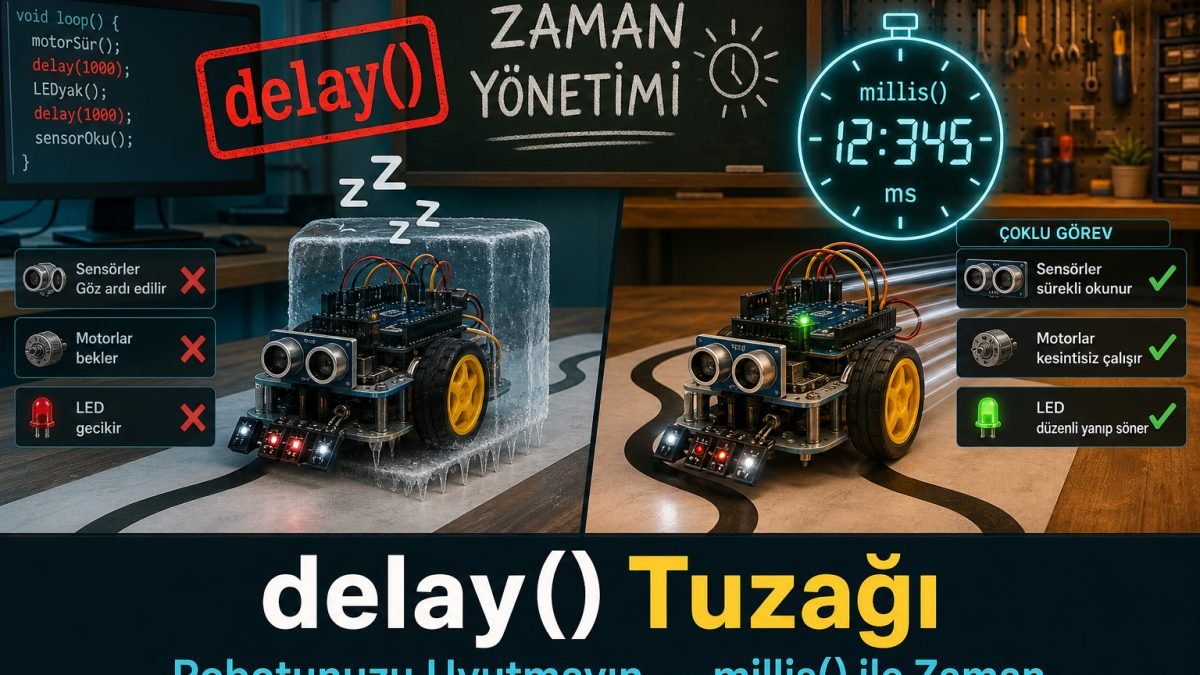
When Arduino hits delay, it does nothing else for that time. Example: turn the light on, wait 2 seconds, then turn left. During those 2 seconds the robot:
- Cannot see a wall ahead (ultrasonic is not read)
- Cannot hear an emergency stop button
- Cannot notice it left the line
delay is not a break; it is a short paralysis. Until it ends, the robot is blind, deaf, and mute.
2) The egg-boiling
delay method: You put the egg in water and stand still for 5 minutes staring at the pot. Phone rings? Ignore it. Door rings? Ignore it.
millis method: You note the time: started at 14:00, take out at 14:05. Then you set the table, cut bread, and glance at the clock. Not ready yet? Keep working.
Pros do not make the robot wait at the stove; they teach it to check the clock.
3) Doing more than one job (millis)
If you want to blink an LED and follow a line at the same time, you cannot use delay. While waiting for the LED, motors stop being driven.
Use millis(), the Arduino wristwatch. Keep following the line and driving motors. Also watch the clock. If 1000 ms passed since the last LED change, toggle the LED — but do not stop.
unsigned long lastTime = 0;
int ledState = LOW;

void loop() {
  // sensor / motor work every loop
  followLine();

  // blink without blocking
  if (millis() - lastTime >= 1000) {
    lastTime = millis();
    ledState = !ledState;
    digitalWrite(LED_BUILTIN, ledState);
  }
}
Workshop note:
delayis not always forbidden. Short waits insetup()or one-shot code outside racing may be fine. Insideloop()with sensors and motors, delay becomes a trap.
If reactions feel late, hunt delay in your code. Do not put the robot to sleep; teach it time management. Real life does not pause; your loop should not either.