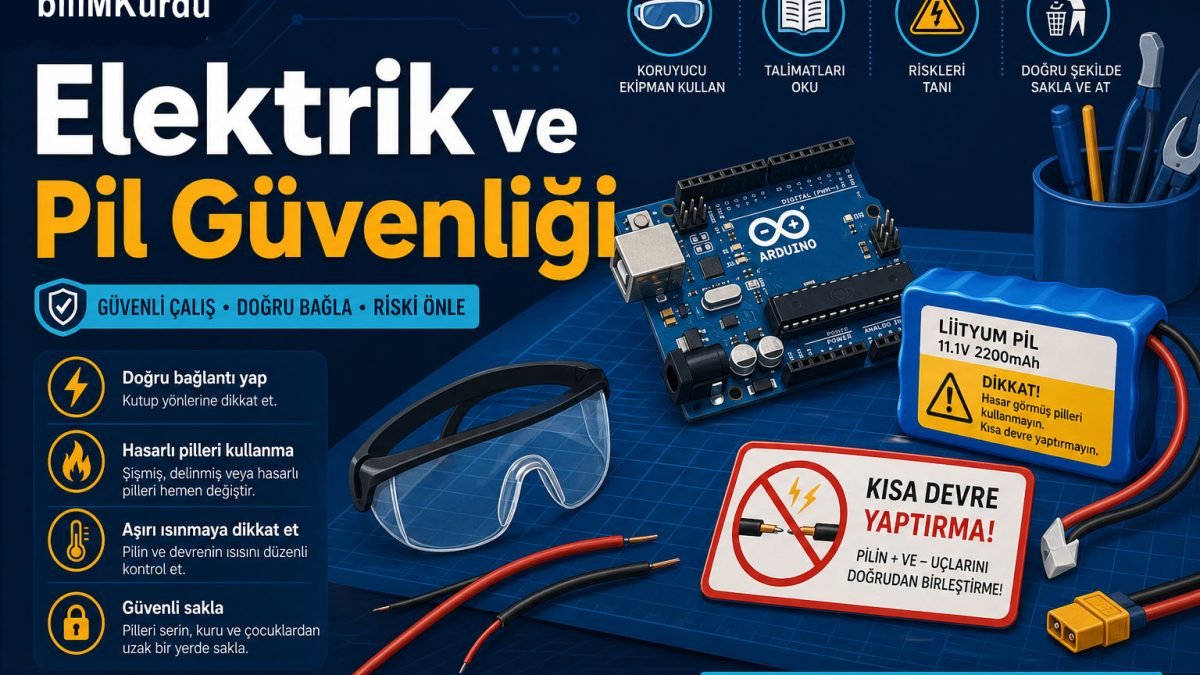
In Arduino, micro:bit, motor driver, and sensor projects, the most common mistakes come from power connections and battery use. A short circuit, reverse polarity, or wrong voltage can damage the board, heat the battery, or even cause a fire. This article explains step by step the rules you should follow when working with electricity and batteries in a school workshop.
Reminder: Check the connections before powering the circuit. If there is doubt, ask your teacher - "looking one more time" is always the fastest way.
Why a separate electricity guide?
In the first article, we discussed general workshop rules. Electricity and batteries, however, appear every day in robotics lessons:
- Power from the computer through USB
- 9 V adapter or battery holder
- Lithium polymer (LiPo) or rechargeable packs
- High-current parts such as motors, servos, and LED strips
These parts are safe when used correctly; when connected incorrectly, damage can happen in seconds.
Basic concepts (short glossary)
| Concept | What does it mean? | Workshop example |
|---|---|---|
| Voltage (V) | The "push force" of electricity | Arduino UNO: 5 V logic, 7-12 V external adapter |
| Current (A / mA) | The amount of electricity flowing through the circuit | LED: about 20 mA; motor: hundreds of mA |
| Polarity (+ / -) | Positive and negative ends | Battery red = +, black = - |
| Short circuit | Direct contact between + and - | Connecting battery ends with a jumper wire |
Before starting work
- Cut the power: Unplug the USB cable, remove the battery, or turn off the main switch.
- Check the table: There should be no loose jumper wires, metal parts, or wet surfaces.
- Choose the correct power source: Use the label on the board or the list given by the teacher.
- Do not use damaged material: Stripped wire, swollen battery, melted plastic - separate it immediately and report it.
Arduino and breadboard safety
What to do
- Always connect a resistor in series with LEDs, usually around 220 ohms; use the value your teacher recommends.
- Use a separate driver board for motors and servos, such as L298N or a motor driver module; do not connect the motor directly to an Arduino pin.
- Keep GND lines common - when combining different power supplies, work under teacher supervision.
- Draw the wiring diagram first, in Fritzing, Tinkercad, or on paper, then transfer it to the breadboard.
Never do these
- Do not try to run a motor from the 5 V output - the pin will burn.
- Do not touch the circuit with wet hands.
- Do not plug in an unknown adapter just because it fits; check voltage and current values.
- Do not leave the power on while removing and inserting parts in a working circuit.
Battery types and school workshop rules
AA / AAA batteries
These are the most common and relatively safe option. Pay attention to polarity in the battery holder; if inserted backwards, the circuit will not work and sometimes heating may occur.
9 V block battery
It is often used for Arduino. In motor projects that draw high current for a long time, it drains quickly and may heat up - ask your teacher if it is suitable for motorized projects.
Lithium polymer (LiPo) and rechargeable packs
They are powerful but risky. In the school workshop, they should be used only with teacher approval and at the assigned charging station.
- Never use a swollen, punctured, or smelly battery.
- Do not leave the battery unattended during charging; there is a fire risk.
- Keep LiPo batteries away from sharp metal, water, and hot surfaces.
- If brought from home: protective box, capacity label, and teacher approval are required.
Parent note: If your child has a rechargeable battery or power bank in the bag, inform the teacher on workshop day. Unsuitable batteries should not be allowed into the classroom.
Charging safety
- Use only the charger approved by the teacher.
- Select the charging mode suitable for the battery type; LiPo needs a balance charger.
- The charging area should be ventilated and supervised; do not charge near flammable materials.
- Unplug the charger when charging ends; do not forget the battery on charge.
- If you see a heating battery or swollen cell: do not touch it, call the teacher, and evacuate the area if needed.
Signs of short circuit and overheating
If any of the following happens, cut the power immediately and tell your teacher:
- Cable or battery suddenly heats up
- Smell, such as burned plastic or chemical odor
- Smoke or sparks
- The chip on the Arduino is very hot
- LED or motor flashes or behaves unexpectedly
After cutting power, examine the circuit together and take notes so the same mistake is not repeated.
Emergency: battery or electricity accident
- Cut the power - unplug, turn off the switch, or separate the battery if possible.
- Small fire: use the correct extinguisher with teacher direction; do not use water on electrical fire.
- Burn: cold running water for at least 10 minutes; no cream, no ice.
- Electric shock: cut power, call 112 if unconscious; do not intervene by yourself.
Quick checklist
- Did I wire while power was off?
- Are voltage and polarity correct?
- Is there a driver board for the motor?
- Is there a resistor with the LED?
- Are the battery and cables in good condition?
- Is charging supervised?
- Is there heat or smell - if yes, did I stop?
Related reading
For general workshop rules, soldering, cutting tools, and robotic test safety, also read the Workshop Safety: Basic Rules article in our category. Building a safe circuit is the first and most important step of the project.
Correct power means a long-lasting project. When you follow the rules, both the materials and you are protected. Ask your teacher about every connection you are unsure of.